Realistic Voices, Everywhere You Read – Introducing Realistic Text-to-Speech (TTS) Streaming & Offline Across Web, iOS & Android

Realistic Text-to-Speech Voices Land on BookFusion — Web, iOS & Android
Our last two updates covered what shipped on Android and iOS. This one is the why: why we built Realistic Text-to-Speech (TTS) ourselves, and why we held it back until it was ready on all three platforms.
Synthetic narration has spent years sounding like a robot reading a phone book. That era ends today for your library.
Realistic Text-to-Speech (TTS) voices are now live across BookFusion for Web, iOS, and Android. Open a book. Pick a voice. Press play. Your eBooks, PDFs, and articles read back to you in voices that actually sound human.
No conversion workflow. No waiting on a rendered audio file. No pre-downloading audio. No GPU server to babysit. Just your books, speaking, on demand.
Two flavors, because readers listen in two very different places
We built realistic TTS twice over, because listening on a train with full bars and listening at 35,000 feet are not the same problem.
Streaming Voices
Streaming voices run on custom Kokoro models with our own tuning and refinements layered on top. We built and operate the TTS service ourselves, and that choice has one very direct benefit for you: subscription prices stay exactly where they are. No tokens to buy. No character caps. No metered minutes. Advanced and Power readers get unlimited streaming across Web, iOS, and Android, in 9+ languages including English (US and UK), Spanish, French, Mandarin, Japanese, and Hindi.
We stream Supertonic voices as well, which widens that to 31 languages: Arabic, Bulgarian, Croatian, Czech, Danish, Dutch, English, Estonian, Finnish, French, German, Greek, Hindi, Hungarian, Indonesian, Italian, Japanese, Korean, Latvian, Lithuanian, Polish, Portuguese, Romanian, Russian, Slovak, Slovenian, Spanish, Swedish, Turkish, Ukrainian, and Vietnamese
If you read in more than one language, or your books do, this is the part worth trying first.
Offline voices
Offline voices run entirely on your device, and they are available on every plan — Free, Casual, Advanced, and Power. No internet. No pre-generating audio and waiting for a download. Your device does the work, sentence by sentence, as you read.
- On iOS , offline voices are powered by Supertonic, built directly into the app, with 31 languages supported. See more in our iOS update
- On Android , offline voices come through the free BookFusion Voice companion app, with 100+ voices across 38+ languages. See more on BookFusion Android 2.23.10 and our BookFusion Voice Release
Planes, subways, remote cabins, and that one dead spot on your commute are all fair game now.
*(Streaming is available on all three platforms. On-device offline voices are an iOS and Android.
Why we ran our own service
We will be direct about the tradeoff, because it shaped the whole feature.
Realistic voice models are not free to run, and that cost has to land somewhere. Most services put it on you and meter it: pay per character generated, per minute listened, per credit consumed. That works fine for a paragraph. It works badly for a 400-page novel, and it turns “listen to another chapter” into an accounting decision.
The other approach is quieter. A number of apps offer realistic voices for “free” by pointing at endpoints built for Microsoft Edge, infrastructure they are not licensed to resell, and Microsoft has said as much on their own forum. We understand the appeal. We are not willing to build a core feature on a door someone else can close, because when it closes it is your listening that stops, mid-chapter, with no warning and no recourse.
So we took the slower road: instead of metering you or reselling someone else’s API, we built and run the TTS service ourselves, tuned the models, and absorbed the cost. Unlimited stays unlimited, your subscription price does not move, and the voices keep working because they are ours to keep working.
And for the readers who would rather nothing leave their device at all, the offline voices exist precisely for that. Your book stays where it is.
The workflow this replaces
Readers who wanted genuinely good narration have been solving this themselves for a while now, with real ingenuity. Open-source projects like
- Audiblez
- epub_to_audiobook and
- ebook2audiobook
- and others
They also ask a lot of you: install dependencies, manage a command line, download models, configure environments, sometimes rent GPU time. Then generate the whole audiobook up front, wait for it to finish, and move the files onto the device you actually read on. If you edit the book or want a different voice, you do it all again.
BookFusion collapses that into four steps:
- Open an eBook, PDF, or article.
- Tap Listen/Play.
- Choose a streaming or offline voice, preview it first, nobody should commit to a voice unheard.
- Play.
The narration is generated as you listen. No scripts, no leftover audio files, no second copy of your library to keep in sync.
It is part of the reader, not a separate app
Realistic voices are not a conversion utility bolted on the side. They live inside the BookFusion reader, which means everything else keeps working while you listen: your synced library, your reading progress, your highlights, your notes, your bookmarks.
Read three chapters on the Web at your desk, keep listening on your phone during the walk home, and pick up the text again that evening exactly where your ears left off. One library. One position. No juggling.
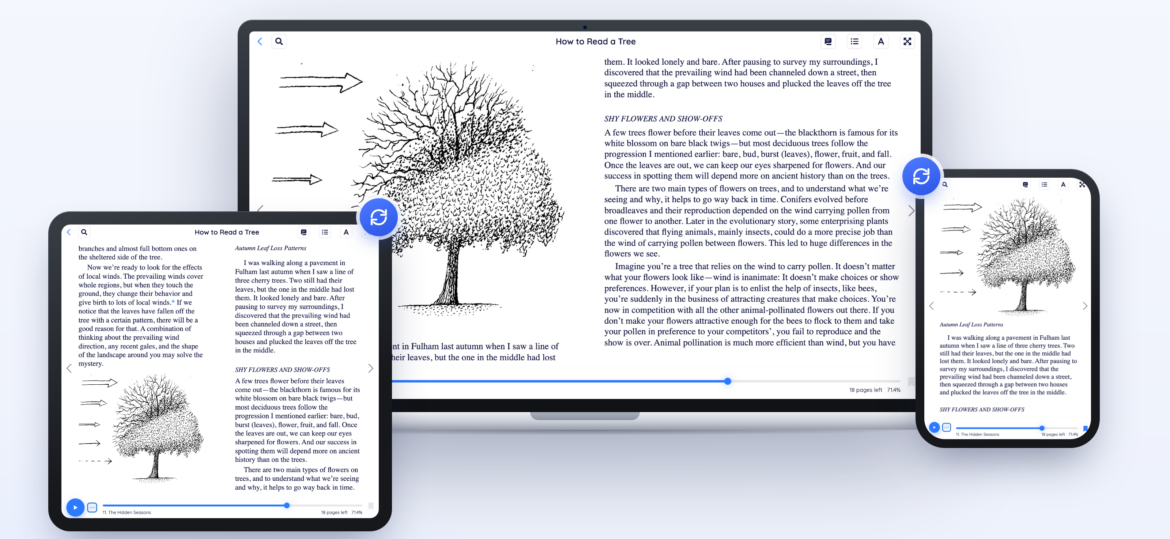
We also spent an enormous number of hours on the listening experience around the voices — sentence-level skip controls, a rewritten sentence tokenizer for more natural pacing, sentence highlighting that follows the narration, TTS in PDFs, footnotes that stop interrupting the flow. Great narration is only half the craft; the reader around it has to keep pace.
Who this is for
Text-to-Speech is often filed under accessibility, and it absolutely belongs there, for readers with low vision, dyslexia, or eye strain, a natural-sounding voice is the difference between finishing a book and abandoning it.
But it is not only that. It is also for the reader with their hands in the dishwater, the language learner who needs to hear pronunciation rather than read it, the student pushing through a dense chapter for the second time, the commuter, the runner, and the person who simply likes being read to.
We are not trying to replace human narrators. A professionally performed audiobook is a genuine creative work, and nothing synthetic matches it. What realistic TTS does is give a voice to the enormous number of books, papers, and documents that will never get an audiobook edition at all , including the ones you wrote, scanned, or saved yourself.
Start listening
Open BookFusion, pick a book, tap Listen, and spend a few minutes auditioning voices. We think you will notice the difference in the first paragraph.
This is the first release of something we intend to keep sharpening, more voices, more languages, a sleep timer, and a few things we are not ready to talk about yet. Tell us which voices you love, which ones read a name wrong, and what your language needs. Some of our best work has started as a reader’s complaint 🙂
Write to us at support@bookfusion.com or reply below.
Happy reading (and listening),
–The BookFusion Team