BookFusion Android 2.23.15 – Better Sorting, Sleep Timer, Dictionaries & More

We’ve been busy polishing the BookFusion experience on Android, with this update bringing several improvements across articles, library organization, metadata, reading controls, highlights, and overall reliability.
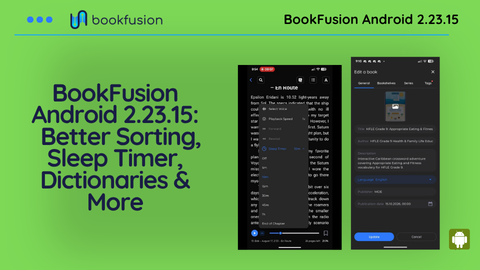
Sleep Mode/Sleep Timer
We’ve added Sleep Mode for Media Overlays and Text-to-Speech (TTS), making it easier to listen to books or articles before bed without letting playback continue long after you’ve fallen asleep.
When you turn on Sleep Mode, you can choose how you want playback to stop:
- After a set amount of time: Choose a time interval, and BookFusion will automatically stop playback when the timer ends.
- At the end of the current chapter: BookFusion will continue playing until the chapter finishes, then stop automatically.
This means you can start listening, get comfortable, and let BookFusion handle the rest. If you fall asleep, playback won’t continue indefinitely, making it much easier to return close to where you last remember listening.
We also added a new Inactivity Timeout / Allow Device Sleep While Reading setting. When enabled, your Android device can follow its normal screen timeout behavior while you’re reading instead of BookFusion continuously keeping the display awake.
Updated Dictionaries & Translation Options
We’ve refreshed the Dictionaries and Translate services available inside the app, keeping the list of supported tools up to date and giving you better options when you need to quickly look something up without leaving your reading flow.
- QuickDic Dictionary – Apps on Google Play
- MDict – Apps on Google Play
- Fora Dictionary – Apps on Google Play
- Aard 2 – Apps on Google Play
- Dictionary – Apps on Google Play
- http://goldendict.mobi/
- Dictionary – Merriam-Webster – Apps on Google Play
- Goldendic
- DictTango
- iTranslate Translator
No Login Required
You can now start reading with BookFusion without creating an account or signing in.
We know that not everyone needs syncing or plans to read across multiple devices. If you simply want a powerful reader for the books stored on one device, you can now jump straight in.
Without an account, you can add and read as many books as you want locally, with all local-only reading features unlocked.
This also addresses a long-standing source of negative Play Store reviews. Some readers downloaded BookFusion expecting a local-only reader and were frustrated when they encountered the sign-up requirement, even though an account was necessary to provide syncing across devices.
Creating a free BookFusion account remains optional and unlocks the benefits of the full BookFusion experience, including syncing your books, highlights, notes, reading progress across devices and more.
Whether you want a great reader for one device or your entire library available everywhere, the choice is now yours.
Articles Beta Update
We wont discuss this in detail here since there will be an announcement with all the features and details of our article feature. The following was done to give readers that are in the beta early access:
- Clean Mode is now available for articles on Android – strips away much of that unnecessary page clutter and gives the actual article room to breathe. The result is a cleaner, more focused reading experience inside BookFusion.
- Article processing progress indicator – gives you clearer feedback while BookFusion prepares an article for reading.
- Edit saved articles and replace the underlying – Update your already saved articles without losing your highlights or notes. This is especially useful when you have an updated copy of an article or simply want to correct what was originally imported
Fixes & Improvements
Some of the most important improvements are the ones you hopefully never notice.
This release includes fixes for crashes related to Android restoring an active reader session, cross-chapter ID collisions, large image processing, Samsung-specific file handling, and an application-not-responding issue involving analytics.
We’ve also improved the behavior of the All Books screen so that changing a search query, sort option, or filter correctly resets your scroll position instead of leaving you stranded somewhere deep in the previous results.
- Publisher & Publication Date is now supported on the book details and editing screen
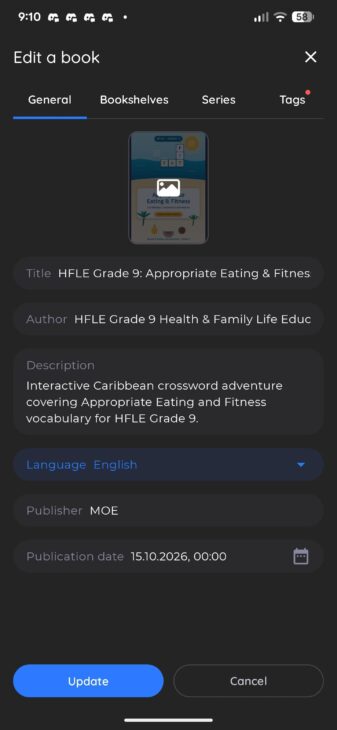
- Sort by Publication Time
- More reliable highlights – Resolved some cases where highlights might not get properly restored and edge cases where image highlights could be placed in the wrong position
- Series not sorted by index
- Fixes for sorting on Series by Index
- Fixed an issue when using Open With for PDFs
- Fixed crash with system restoration of a reader
- Expand the pop over menu on the bookshelf
- Fix image highlight has a wrong position after creation (cutout offsets)
- AllBooks: Scroll position should be reset with new query/sort/filters
- Other fixes & improvements
None of these changes are particularly glamorous. All of them help make BookFusion more dependable.
What comes next
As usual, please reach out to us with your feedback, bug reports, and suggestions. A lot of these improvements start with readers telling us where something feels rough, confusing, or simply could be better.
And if you absolutely love using BookFusion, consider leaving us a review on Google Play. It helps more readers discover us and supports the work that goes into making BookFusion better with every release.
- Refine & Launch Articles: This is now mostly done and we are working on a stretch goal item before launch.
- Support list view on bookshelf
- Area highlights for EPUBs
- Native CBZ/CBR Support
- Support page numbers (no longer only percentage)
- Custom headers and footers ( clock, battery, reading time & more)
- Many more (let us know what you would like to see)
We build BookFusion for readers who care about the details, which means your eye catches things ours misses. Tell us what feels off, what feels good, and what you wish existed. Write to us at support@bookfusion.com or reply below
Grab the latest update from Google Play or the APK Download: Android 2.23.15 APK Download
Happy reading (and listening),
— The BookFusion Team