BookFusion for iOS 1.44.1: Inline Highlights, TOC & Search, More Customization & No Sign-Up Required

We’re back with another BookFusion for iOS update, bringing more flexibility, control, and convenience to your reading experience.
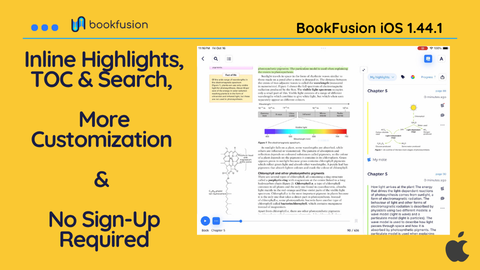
This release introduces side-by-side reading panels (Inline highlights, TOC, & Search), better reader settings, improved EPUB styling controls, and the freedom to add unlimited books without creating an account.
Whether you’re researching a topic, revisiting your favorite highlights, or simply enjoying a good book, these improvements make it easier to read your way.
Inline/Side Panels Highlights, TOC & Search
Ever wanted to review your highlights while reading, search for a particular term without losing your place, or keep the Table of Contents visible as you explore a book?
Now you can!
With our new Inline Highlights, Search & Table of Contents panels, you can open up to two additional panels alongside your book or article, keeping the tools you need right where you need them.
Here’s what you can do:
- Review highlights as you read: Keep your highlights visible alongside the text, making it easier to revisit important ideas and connect information as you go.
- Search without interrupting your reading: Browse search results alongside your book or article, quickly finding references and exploring passages without switching between views.
- Navigate with the Table of Contents: Keep your chapters and sections within reach, making it easier to explore and jump between different parts of your book.
- Resizable Panels: Drag the edges of each panel to resize them. Give your book more room when you want to focus, or expand a panel when you need to explore its contents.
You can even combine panels. Keep your highlights open on one side and search results on the other, all while continuing to read.
Whether you’re studying, researching, or following a particularly interesting thread in a book or article, your reading and reference tools can now work together instead of competing for your attention.
No Account Required!
Want to read your books without signing up for another account? We’ve got you covered.
You can now add and read unlimited books directly on your device without creating a BookFusion account or signing in.
Simply open BookFusion, add your books, and start reading. All features that work entirely on your device are available without an account. We know that not everyone needs to sync their library across multiple devices. Some readers simply want a great reading experience on their iPhone or iPad, and that’s exactly what this update delivers.

Want the full connected BookFusion experience? Signing in still lets you sync your books, reading progress, highlights, and more across iOS, Android, Web, and Desktop.
Read locally with all features unlocked or take your library everywhere on all devices when you are ready.
Other Updates
- Publisher Style Control Improvements: With our improved Publisher Style Controls, you can easily choose whether to preserve a publisher’s formatting or override it with your preferred reader settings.
- Reader Settings Adapt to Your Screen: The settings interface now automatically adjusts to the available screen space, switching to an expanded layout whenever there’s enough room.
- Share Highlights with Better Formatting: Previously, highlights containing multiple paragraphs could lose their original paragraph breaks when shared, making longer passages harder to read. Now, shared highlights preserve their original paragraph breaks, keeping the structure of the text intact.
Fixes & Improvements
- Resolved a crash affecting PDF books on iOS 27 when using the Legacy Reader
- Search relevance sorting is now consistently available.
- Fixed books being clipped at the edges of the screen. Books now fade smoothly as they move beyond the visible area.
- Fixed PDF pages being cropped in full-screen mode when using the Legacy Reader.
- Fixed the invisible Done button on iOS 27 and improved its visibility.
- The keyboard now dismisses automatically when closing the search side panel.
- Fixed a visual issue on the main screen when opening full-screen views on iPhone Duo.
We build BookFusion for readers who care about the details, which means your eye catches things ours misses. Tell us what feels off, what feels good, and what you wish existed. Write to us at support@bookfusion.com or reply below
Update BookFusion for iOS through the Apple App Store and give them a try.
Happy reading (and listening),
— The BookFusion Team